

I am using Tapo C110 with RTSP.
- -
You must have OrcaSlicer and VLC installed. You must create a batch file like camera.bat and put:
- -
taskkill /f /im "vlc.exe" && start "" "C:\Program Files\VideoLAN\VLC\vlc.exe" start vlc -vvv -Idummy rtsp://user:password@192.168.1.xxx/stream1 --sout #transcode{vcodec=MJPG,venc=ffmpeg{strict=1},fps=10,width=1280,height=720}:standard{access=http{mime=multipart/x-mixed-replace;boundary=--7b3cc56e5f51db803f790dad720ed50a},mux=mpjpeg,dst=:9911/}
- -
evertyhing in one line. RUN IT AS ADMIN!
- -
IP 192.168.1.xxx replace with your camera IP and also username and password.
- -
You must enter this IP in the camera settings: http://127.0.0.1:9911
- ---
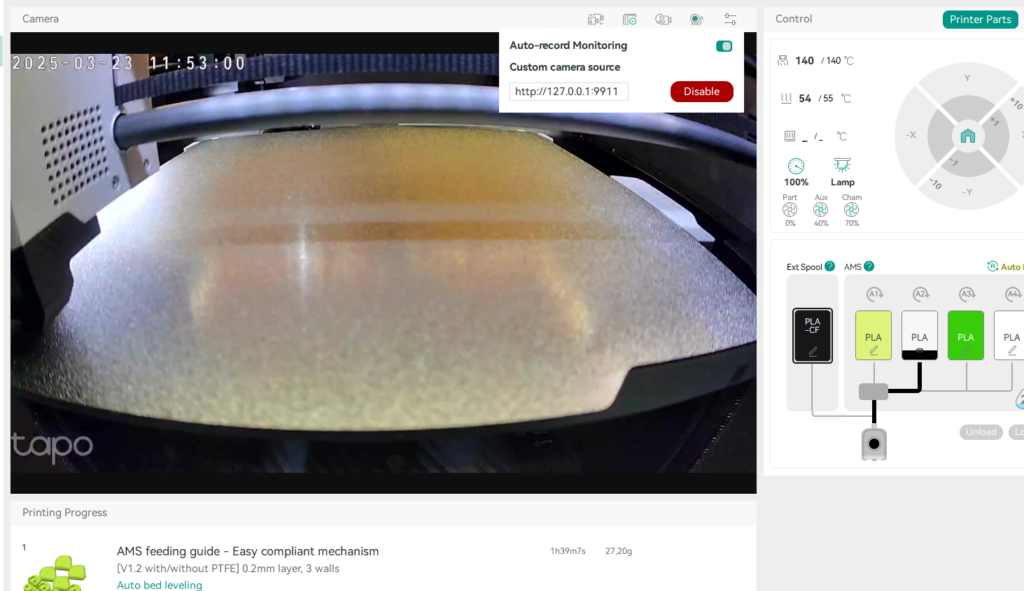
3D printer, OrcaSlicer and custom camera